mini-lab
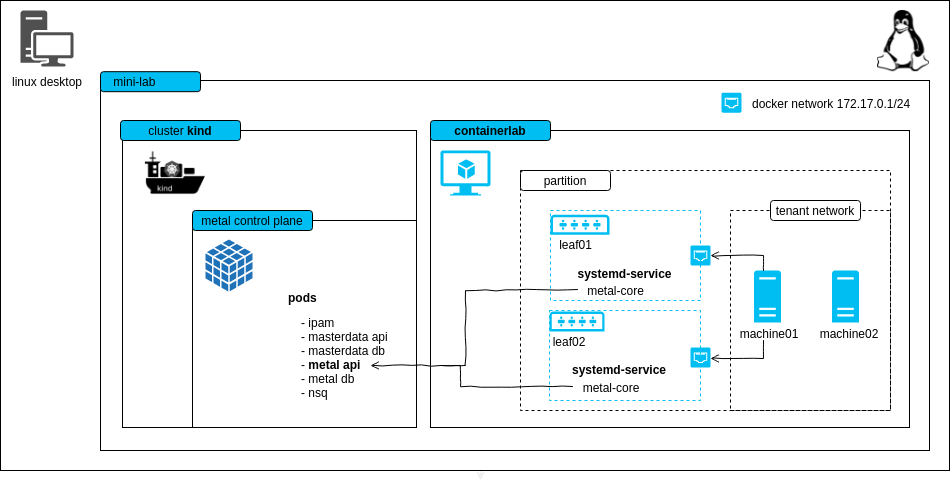
The mini-lab is a small, virtual setup to locally run the metal-stack. It deploys the metal control plane and a metal-stack partition with two simulated leaf switches. The lab can be used for trying out metal-stack, demonstration purposes or development.
ℹ This project can also be used as a template for writing your own metal-stack deployments.
<!– TOC depthfrom:2 depthto:6 withlinks:true updateonsave:false orderedlist:false –>
<!– /TOC –>
Requirements
- Linux machine with hardware virtualization support
- kvm as hypervisor for the VMs (you can check through the
kvm-okcommand) - docker >= 20.10.13 (for using kind and our deployment base image)
- kind == v0.20.0 (for hosting the metal control plane)
- containerlab >= v0.47.1
- the lab creates a docker network on your host machine (
172.17.0.1), this hopefully does not overlap with other networks you have - (recommended) haveged to have enough random entropy (only needed if the PXE process does not work)
Here is some code that should help you to set up most of the requirements:
# If UFW enabled.
# Disable the firewall or allow traffic through Docker network IP range.
sudo ufw status
sudo ufw allow from 172.17.0.0/16

# Install kvm
sudo apt install -y git curl qemu qemu-kvm haveged

# Install Docker
curl -fsSL https://get.docker.com | sh
# if you want to be on the safe side, follow the original installation
# instructions at https://docs.docker.com/engine/install/ubuntu/

# Ensure that your user is member of the group "docker"
# you need to login again in order to make this change take effect
sudo usermod -G docker -a ${USER}

# Install containerlab
bash -c "$(curl -sL https://get.containerlab.dev)"

# Install kind (kubernetes in docker), for more details see https://kind.sigs.k8s.io/docs/user/quick-start/#installation
sudo curl -Lo /usr/local/bin/kind "https://kind.sigs.k8s.io/dl/v0.20.0/kind-linux-amd64"
sudo chmod +x /usr/local/bin/kind
The following ports are used statically on your host machine:
| Port | Bind Address | Description |
|---|---|---|
| 6443 | 0.0.0.0 | kube-apiserver of the kind cluster |
| 4443 | 0.0.0.0 | HTTPS ingress |
| 4150 | 0.0.0.0 | nsqd |
| 8080 | 0.0.0.0 | HTTP ingress |
Known Limitations
- to keep the demo small there is no EVPN
- machine restart and destroy does not work because we cannot change the boot order via IPMI in the lab easily (virtual-bmc could, but it's buggy)
- login to the machines is possible with virsh console, login to the firewall is possible with SSH from your local machine
Try it out
git clone https://github.com/metal-stack/mini-lab.git
cd mini-lab
Start the mini-lab with a kind cluster, a metal-api instance as well as two containers wrapping leaf switches and another container that hosts two user-allocatable machines:
make
# containerlab will ask you for root permissions (https://github.com/srl-labs/containerlab/issues/669)
After the deployment and waiting for a short amount of time, two machines in status PXE booting become visible through metalctl machine ls:
docker compose run --rm metalctl machine ls

ID                                          LAST EVENT   WHEN     AGE  HOSTNAME  PROJECT  SIZE          IMAGE  PARTITION
e0ab02d2-27cd-5a5e-8efc-080ba80cf258        PXE Booting  3s
2294c949-88f6-5390-8154-fa53d93a3313        PXE Booting  5s
Wait until the machines reach the waiting state:
docker compose run --rm metalctl machine ls

ID                                          LAST EVENT   WHEN     AGE  HOSTNAME  PROJECT  SIZE          IMAGE  PARTITION
e0ab02d2-27cd-5a5e-8efc-080ba80cf258        Waiting      8s                               v1-small-x86         mini-lab
2294c949-88f6-5390-8154-fa53d93a3313        Waiting      8s                               v1-small-x86         mini-lab
Create a firewall and a machine with:
make firewall
make machineAlternatively, you may want to issue the metalctl commands on your own:
docker compose run --rm metalctl network allocate \
        --partition mini-lab \
        --project 00000000-0000-0000-0000-000000000000 \
        --name user-private-network

# lookup the network ID and create a machine
docker compose run --rm metalctl machine create \
        --description test \
        --name machine \
        --hostname machine \
        --project 00000000-0000-0000-0000-000000000000 \
        --partition mini-lab \
        --image ubuntu-20.04 \
        --size v1-small-x86 \
        --networks <network-ID>

# create a firewall that is also connected to the virtual internet-mini-lab network
docker compose run --rm metalctl machine create \
        --description fw \
        --name fw \
        --hostname fw \
        --project 00000000-0000-0000-0000-000000000000 \
        --partition mini-lab \
        --image firewall-ubuntu-2.0 \
        --size v1-small-x86 \
        --networks internet-mini-lab,$(privatenet)
See the installation process in action
make console-machine01/02
...
Ubuntu 20.04 machine ttyS0

machine login:
Two machines are now installed and have status "Phoned Home"
docker compose run --rm metalctl machine ls
ID                                          LAST EVENT   WHEN   AGE     HOSTNAME  PROJECT                               SIZE          IMAGE                             PARTITION
e0ab02d2-27cd-5a5e-8efc-080ba80cf258        Phoned Home  2s     21s     machine   00000000-0000-0000-0000-000000000000  v1-small-x86  Ubuntu 20.04 20200331             mini-lab
2294c949-88f6-5390-8154-fa53d93a3313        Phoned Home  8s     18s     fw        00000000-0000-0000-0000-000000000000  v1-small-x86  Firewall 2 Ubuntu 20200730        mini-lab
Login with user name metal and the console password from
docker compose run --rm metalctl machine consolepassword e0ab02d2-27cd-5a5e-8efc-080ba80cf258If you want to access the firewall with SSH or have internet connectivity from the firewall and machine, you'll need to have a static route configured that points to the leaf switches:
# Add the route to the network internet-mini-lab 100.255.254.0/24 via leaf01 and leaf02, whose IPs are dynamically allocated. Make sure there's no old route before execution.
make route

# Connect to the firewall
ssh metal@100.255.254.1
To remove the kind cluster, the switches and machines, run:
make cleanupReinstall machine
Reinstall a machine with
docker compose run --rm metalctl machine reinstall \
        --image ubuntu-20.04 \
        e0ab02d2-27cd-5a5e-8efc-080ba80cf258
Free machine
Free a machine with make free-machine01 or
docker compose run --rm metalctl machine rm e0ab02d2-27cd-5a5e-8efc-080ba80cf258Flavors
There's few versions of mini-lab environment that you can run. We call them flavors. There's 2 flavors at the moment:
default– runs 2 machines.cluster-api– runs 3 machines. Useful for testing Control plane and worker node deployment with Cluster API provider.sonic– use SONiC as network operating system for the leaves
In order to start specific flavor, you can define the flavor as follows:
export MINI_LAB_FLAVOR=cluster-api
make